AP4.0 Turbo is Now Released!

EQC Compliance Advisory is pleased to announce the release of AP4.0 Turbo, a new-generation audit automation program developed for Hong Kong CPA practices that want the workflow power promoted under Audit Program 4.1, but do not need the two AP4.1-only modules for Illustrative Audited Financial Statement Generation and AFRC Compliance Document Compilation.
 
AP4.0 Turbo is not a repackaging of the old AP4.0 page. It should be understood as the AP4.1-generation audit workflow for audit file production and practice management, built around the same new operating problems highlighted for AP4.1: talent shortage, rising operating costs, increased AFRC inspection pressure, incomplete working papers, inefficient file organization, manual data input, staff handover risk, and billing delays caused by slow audit preparation processes.
 
The purpose of AP4.0 Turbo is to give CPA practices access to the new AP4.1-style workflow enhancements that matter most for daily audit execution: OCR-assisted prior-year AFS intake, direct source-file path workflow, improved controllers, embedded auto-fill, reduced manual input by up to 60%, around 20 minutes for key engagement data input and source-data workflow preparation, improved AML sanctions screening, whole-firm management dashboard, server/NAS synchronization, session-based error logs, monthly activation workflow, and pay-by-month subscription option.
 
In practical terms, AP4.0 Turbo gives practices the AP4.1-generation audit automation experience for engagement intake, AML screening, audit planning, source data extraction, OCR review, guided input completion, working paper generation, file organization, management monitoring, server synchronization and support troubleshooting. The only two AP4.1 functions intentionally excluded from AP4.0 Turbo are the generation of illustrative audited financial statements in Excel, PDF and Word, and the compilation of AFRC Annex B / compliance documents.
 
This makes AP4.0 Turbo suitable for practices that want to modernize audit operations now, reduce manual data handling, improve consistency across engagement files, support staff continuity, and give management better oversight across the firm, while keeping the subscription focused on audit workflow automation rather than financial statement output and AFRC document compilation.
 
Demonstrations are now available. 
 
To schedule a private demonstration, please contact EQC by WhatsApp at +852 9543 3218, telephone +852 6015 7080, or email .

What Makes AP4.0 Turbo New?

AP4.0 Turbo should be viewed through the same lens as the AP4.1 launch: it is a major workflow enhancement designed to make audit operations more practical for everyday use by staff and more useful for owners and management members who need visibility over the whole practice. The focus is not merely generating a few old working papers faster. The focus is reducing repeated input, making source files easier to use, improving engagement continuity, organizing generated files more reliably, and giving management stronger control over engagement progress.
 
The following table summarizes the new AP4.1-generation functions that should be promoted as part of AP4.0 Turbo, except where clearly marked as AP4.1-only.

AP4.1 Generation Function

What it Means in AP4.0 Turbo?

AP4.0 Turbo

Full AP4.1

OCR technology for prior-year audited financial statements

AP4.0 Turbo can use OCR-assisted intake to scan prior-year audited financial statement information into a review worksheet. 

Included

Included

Reduced manual data input by up to 60%

Through OCR scanning, direct file path entry, embedded auto-fill and improved controllers, AP4.0 Turbo reduces the manual input previously required to prepare engagement data and audit working paper generation.

Inlcuded

Inlcuded

Around 20 minutes for key engagement data input and source-data workflow preparation

AP4.0 Turbo adopts the AP4.1-style shortened preparation cycle so audit teams can move faster from source files to usable audit workflow outputs

Included

Included

Direct file path entry and browsing

Users can browse for or enter paths to source files such as current-year ledger files, prior-year audited financial statements in PDF format and prior-year COA forms. This reduces fixed-folder movement and manual file handling

Included

Included

Automatic workflow path fields

The workflow can show how AP4.0 Turbo will populate key controller and mapping workbooks, making the generation process clearer to staff.

Included

Included

Server and NAS synchronization

Generated audit files can be saved locally and to designated server or NAS locations, supporting centralized firm storage and reducing version-control problems.

Included

Included

Monthly activation code workflow & Pay-by-Month Subscription Plan

Monthly renewal users can extend access by activation code without requiring remote or in-person intervention merely to update expiry dates.

Included

Included

Illustrative Audited Financial Statement Generation

Generates illustrative audited financial statements in Excel, PDF and Word formats

Not Included

Included

AFRC Compliance Document Compilation

Compiles Annex B Engagement Lists and related compliance documents for typical AFRC inspection submission requirements

Not Included

Included

New-Generation Source Data Intake and OCR Workflow

AP4.0 Turbo adopts the AP4.1-generation source-data workflow. Users can indicate whether the current-year ledger file, prior-year audited financial statements in PDF format and prior-year COA form are available, and then browse for the corresponding file paths directly. This is a major improvement because source files no longer need to be forced into a fixed folder structure before the workflow can begin.
 
The OCR-assisted workflow is particularly important. Prior-year audited financial statements can be scanned into an OCR review worksheet. Users can then amend, delete, add or replace OCR results directly inside the review sheet before committing approved answers into the Main worksheet. This makes the intake process more controlled and reduces repeated manual keying.

Principal Activity and Accounting Estimate Search Tools

AP4.0 Turbo includes the AP4.1-generation search tools for principal activities and accounting estimates. The Search for PA worksheet provides filtered principal activity results with a brief description and an explanation of expected revenue recognition. Users can then add the selected principal activity directly to the correct Main worksheet row with one button. A separate function can mark the second principal activity as not applicable without requiring users to complete multiple fields manually.
 
The Search for AE worksheet improves keyword searching for accounting estimates. Filtered results show the relevant financial reporting framework and a brief description of each accounting estimate. Users can add a selected accounting estimate directly to the correct Main worksheet row and cells, and a No other accounting estimate function can fill remaining blank accounting estimate fields where appropriate.
 
These functions are important because principal activities, revenue recognition and accounting estimates are not merely administrative fields. They affect audit planning, risk understanding and the quality of documentation. AP4.0 Turbo therefore helps staff complete these areas more consistently while reducing repetitive manual input

Improved AML Sanctions Screening

AP4.0 Turbo includes the improved AML sanctions screening workflow promoted for AP4.1. Users can now identify whether a stakeholder is an individual or an entity, and irrelevant columns are greyed out based on the selected search type. This makes the input worksheet clearer and reduces unnecessary data entry confusion.
 
The sanctions screening process continues to access the United Nations sanctions list, but now includes fallback download sources if the primary source cannot be accessed. This reduces the risk of downtime when screening must be completed for engagement acceptance or continuance.
 
The AML report output is also improved. Reports are saved into a dedicated AML Search Reports folder, include firm identity and contact details, include improved summary tables, and the report generation process has been optimized to be approximately 80% faster.

Whole-Firm Management Dashboard and
Server/NAS Synchronization

AP4.0 Turbo includes the AP4.1-generation management dashboard improvement. The dashboard now supports access-role-based behavior. A User workstation can focus on engagements and credit usage generated from that computer’s local drive, while a Management workstation can consolidate engagement activity and credit usage from configured user workstations through server or NAS files.
 
This is a significant management improvement for CPA practices. It helps owners and managers monitor what has been generated, which engagements are in progress, where bottlenecks may exist, and how credits are being used. It also helps staff handover because the firm can identify the last generated stage for an engagement instead of relying only on individual staff memory.
 
AP4.0 Turbo also supports server/NAS synchronization for generated audit files. Generated audit outputs can be saved both locally and to a configured firm storage location. This improves centralized file management and reduces version-control problems between local C drives and firm servers.

Subscription Convenience: Monthly Activation and
Pay-by-Month Option

AP4.0 Turbo benefits from the AP4.1-generation activation and subscription workflow. Monthly renewal users can extend access through an activation code, reducing the need for remote or in-person intervention merely to update expiry dates.
 
The AP4.1 product page also lists AP4.0 Turbo subscription plans under the Early Bird promotion. The page states that Plan C is a one-year AP4.0 Turbo subscription with unlimited credits for 7 users by advance payment, and Plan D is a one-year AP4.0 Turbo subscription with unlimited credits for 7 users payable by month.

Available Plans

Description

Payment Structure

Early Bird Promo Conditions

Plan C:

1-year subscription of AP4.0 Turbo with unlimited credits for 7 users

Advance payment: HK$71,250 net, 5% discount (After Early Bird: HK$75,000)

5% discount where payment is made on or before 28 May 2026.

Plan D:

1-year subscription of AP4.0 Turbo with unlimited credits for 7 users

Payable by month: HK$6,650 per month, net 5% discount (After Early Bird: HK$7,000 per month)

5% discount where contract is signed and the first of twelve instalments is paid on or before 28 May 2026.

Why Choose AP4.0 Turbo?

Agentic AI Functionality
Seamless Automation
Cost Effectiveness

AP4.0 Agentic AI Functionality
AP4.0 Seamless Automations
AP4.0 Cost Effectiveness

AP4.0 Turbo operates entirely offline, ensuring absolute data security with no risk of data leakage through online interactions.

From importing client data to generating completed working papers, AP4.0 Turbo simplifies the entire process.

Reduce operating costs by up to 80%. Use less resources to do more today!

AP4.0 Demonstration Part 1:

AP4.0 Demonstration Part 2:

Client Acceptance Procedures & UN Sanction Screening:

  • Address engagement continuance / client acceptance in recurring qualifications
  • Address long-association with clients
  • Performs audit risk assessments
  • Preliminary engagement activities
  • Engagement budget and planning
  • Assesses eligibility for adopting SME-FRF
  • Assesses need for consolidation / reporting exemption
  • Performs initial UN Sanction screening on directors, shareholders and Ultimate beneficial owners, and provides tools for ongoing screening

Client Acceptance Procedures

Completes Audit Planning:

AP4.0 Functions - Completes Audit Planning
  • Uses the 2024-APM (issued by HKICPA)
  • Performs auto-calculations on materiality and line-specific performance materiality (for planning, revised & final)
  •  Reviews accounting estimates and risk assessments on estimates (including inherent & control risk assessments)
  • Illustrative documentation on industry-specific internal controls, covering key cycles, such as revenues, cost of sales, inventories, salaries, receivables, payables, treasures, expenditures, PPE, investments, equity & debt securities, investments in subsidiaries, associates and JVs, bank balances, loans, and more!
  • Assertion-level and financial statement-level risk assessments
  • Revenue & Cost of Sales industry-specific analyses identifying point of recognition and documentary evidence specific to reporting framework and industry
  • Completes APM sections A to V. 

Writes Illustrative Analytical Reviews:

  • Writes illustrative line-by-line year-over-year fluctuation analyses
  • For each BS & PL line, calculates y-o-y fluctuation and determine if it’s increase / decrease
  • Determines performance materiality for each line
  • Compares fluctuation against performance materiality
  • Determines materiality
  • Add audit notes based on trends and materiality on reasons for fluctuation
  • Utilizes industry specific knowledge and reporting framework-specific standards in writing illustrative explanations for each line item
  • Accounts for risk level to determine if more extensive documentation is needed on high-risk account balances / transactions
  • Subsequent audit adjustments would auto-update analytical reviews with a click of a button

AP4.0 Function - Analytical Review Procedures

Determines Sample Size:

AP4.0 Function - Sample Size Determination
  • Directly accesses the trial balance to retrieve population to be tested
  • Retrieves performance materiality and materiality from audit planning files
  • Directly access ledgers to screen for samples above & below performance materiality
  • Creates sample selection planning sheets for all selected BS & PL line items
  • Adds titles with specific assertion and BS / PL account tested, renames worksheets with work paper references
  • Sorts worksheets alphabetically,
  • Determines number of samples above and below performance materiality

Designs Audit Procedures on Each BS & PL Line Item:

  • Designs Audit Procedures for test of details for each Balance Sheet and Profit or Loss line-item
  • Creates at least 1 test of detail work paper each line item
  • Adds procedures directly to tests of detail work papers
  • Adds work paper references, renames worksheets using references and sorts worksheets alphabetically
  • Adds title, name of balance, objectives, risk levels, PM, and sampling factors to tests of details
  • Calculates tested coverages, 
  • All procedures are industry-specific (As of 2025 June: 272 industries) and
  • All procedures are financial reporting framework specific (SME / PE / HKFRS)
  • 2000+ types of testing
AP4.0 Functions - Designs Audit Procedures

Auto-Select Samples Directly From Ledger Files:

AP4.0 Functions - Auto Select Samples from Ledger Files
  • Auto Selects most material samples from ledger files
  • Copies voucher numbers, voucher dates, description and amounts of selected samples from ledger files into generated test of detail work papers
  • Auto-sorts sample selection planning sheets and test of details so they are placed next to each other
  • Eliminates human errors and ensures 100% accuracy
  • Eliminates mismatch in sample sizes between sample designs and tests of details

Auto-Revise Audit Work Papers:

  • Auto-Revises Audit Work Papers,
  • By simply adding audit adjustments and the clicking 1 button, Auto-revision includes:
  • Re-calculates materiality and performance materiality (without replacing planning materialities)
  • Re-calculates sample sizes for each BS & PL sample selection planning sheet
  • Based on new sample sizes, accesses ledger files to select additional samples or reduce samples, if needed
  • Updates analytical reviews using revised / adjusted trial balances

AP4.0 Functions - Auto-Revise Audit Work Papers

Integration with Almost Any Accounting Software:
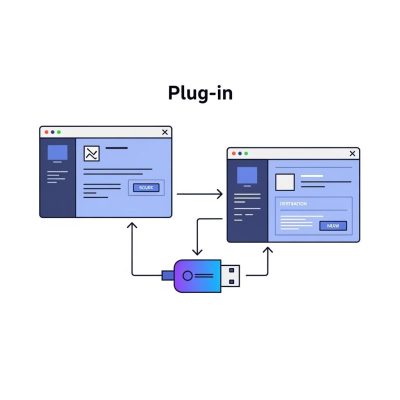
AP4.0 Functions - Integration with Accounting Software
  • Integrates with Accounting Software
  • Plug-Ins available to directly extract ledger data from excel file formats
  • Integrations ready-for-use for Xero, PeachTree, Quickbooks, MYOB, Inspur, KingDee, MasterSoft, Manager.IO, etc.
  • By simply clicking 1 button to extract a whole year’s ledger to allow AP4.0 direct access
  • There are no extra fees for new plug-in development and usage

AFRC Inspection-Tested:

  • Compliance Protection from Regulatory Inspections
  • Easily and safely pass AFRC Inspections
  • No Last-Minute Preparations,
  • Gain Peace of Mind
  • All Files Ready for AFRC Sampling & Inspection
  • Audit Work Papers Renamed, Filed and Organized

AP4.0 Functions - Compliance Protection from Regulatory Inspections

Multi-Engagement Management Dashboard:

We’re excited to announce the launch of our new Multi-Engagement Management Dashboard, a powerful real-time analytics tool that revolutionizes how CPA firms track and manage their audit engagements. This comprehensive dashboard provides instant visibility into your entire audit portfolio through an intuitive web-based interface that displays engagement status distribution, credit utilization, and AML compliance tracking all in one centralized location. With interactive pie charts and detailed engagement breakdowns, audit managers can now quickly identify bottlenecks, monitor progress across multiple clients, and ensure timely completion of critical audit milestones.
 
The dashboard seamlessly integrates with your existing AP4.0 workflow, automatically synchronizing data  and providing actionable next-step guidance for each engagement stage. From initial client setup through finalized working papers, the system tracks five key audit phases and presents clear instructions for advancing each engagement to completion. The built-in AML status monitoring helps ensure regulatory compliance by tracking sanction screening activities and identifying clients missing required stakeholder information, while the credit management section provides real-time visibility into your subscription usage and remaining capacity.
 
Designed with responsiveness in mind, the dashboard adapts perfectly to any screen size and automatically opens in your default web browser with a single click from the main AP4.0 interface. All data on your dashboard is offline, ensuring sensitive client data remains protected. Whether you’re managing a handful of engagements or overseeing hundreds of audit files, this dashboard transforms complex data into clear, actionable insights that drive efficiency and improve audit quality across your entire practice.
  • Engagement Management Tools that allow users to check what has been generated and when,
  • Helps with progress checking
  • Helps resuming work by checking what was last generated for each audit engagement
  • Especially advantageous with staff turnover, handover of work and engagement continuity
  • Embedded features for rollover of audit work papers
  • Easy migration to next Audit Program versions
PHP Code Snippets Powered By : XYZScripts.com
Scroll to Top